DateChooser

Conteúdo
Esta classe se propõe a exibir um JDialog com um calendário e opção para escolher dia, mês e ano. Retorna um tipo java.util.Date
DateChooser
import java.awt.Color;
import java.awt.Container;
import java.awt.Dialog;
import java.awt.Frame;
import java.awt.GridLayout;
import java.awt.LayoutManager;
import java.awt.event.ActionEvent;
import java.awt.event.ActionListener;
import java.awt.event.FocusEvent;
import java.awt.event.FocusListener;
import java.awt.event.ItemEvent;
import java.awt.event.ItemListener;
import java.awt.event.KeyEvent;
import java.awt.event.KeyListener;
import java.awt.event.MouseEvent;
import java.awt.event.MouseListener;
import java.util.Calendar;
import java.util.Date;
import java.util.GregorianCalendar;
import javax.swing.BorderFactory;
import javax.swing.JButton;
import javax.swing.JComboBox;
import javax.swing.JDialog;
import javax.swing.JLabel;
import javax.swing.JPanel;
import javax.swing.border.Border;
/**
* Uma caixa de dialogo que tem por objetivo entrada de datas
* A classe <code>DateChooser</code> apresenta um calendar e permite
* o usuário selecionar visualmente dia, mês e ano. Não permitindo selecionar
* uma data inválida.
**/
public class DateChooser extends JDialog implements ItemListener, MouseListener, FocusListener, KeyListener, ActionListener
{
/** nome dos meses */
private static final String[] MONTHS =
new String[] {"Janeiro", "Fevereiro", "Março" , "Abril" , "Maio" , "Junho" ,
"Julho" , "Agosto" , "Setembro", "Outubro", "Novembro", "Dezembro"};
/** nomes dos dias da semana */
private static final String[] DAYS = new String[] {"Dom","Seg","Ter","Qua","Qui","Sex","Sáb"};
/** posição X e Y na tela do dialog, por padrão é na posição zero */
private int posX = 0;
private int posY = 0;
/** cor dos dias da semana no cabeçalho */
private static final Color WEEK_DAYS_FOREGROUND = Color.black;
/** cor dos números */
private static final Color DAYS_FOREGROUND = Color.blue;
/** cor do dia selecionado */
private static final Color SELECTED_DAY_FOREGROUND = Color.white;
/** cor do texto do dia selecionado */
private static final Color SELECTED_DAY_BACKGROUND = Color.blue;
/** Empty border, usado quando o calendário não possui o foco */
private static final Border EMPTY_BORDER = BorderFactory.createEmptyBorder(1,1,1,1);
/** Border usado quando calendário tem foco */
private static final Border FOCUSED_BORDER = BorderFactory.createLineBorder(Color.yellow,1);
/** primeiro ano permitido no calendário */
private static final int FIRST_YEAR = 1920;
/** último ano permitido */
private static final int LAST_YEAR = 2020;
/** Variável usada para calcular as datas */
private GregorianCalendar calendar;
/** Calendar, as a matrix of labels. The first row represents the
first week of the month, the second row, the second week, and
so on. Each column represents a day of the week, the first is
Sunday, and the last is Saturday. The label's text is the
number of the corresponding day. */
private JLabel[][] days;
/** Day selection control. It is just a panel that can receive the
focus. The actual user interaction is driven by the
<code>DateChooser</code> class. */
private FocusablePanel daysGrid;
private JComboBox month;
private JComboBox year;
private JButton ok;
private JButton cancel;
/** Day of the week (0=Sunday) corresponding to the first day of
the selected month. Used to calculate the position, in the
calendar ({@link #days}), corresponding to a given day. */
private int offset;
/** Last day of the selected month. */
private int lastDay;
/** Selected day. */
private JLabel day;
/** <code>true</code> if the "Ok" button was clicked to close the
dialog box, <code>false</code> otherwise. */
private boolean okClicked;
/**
* Custom panel that can receive the focus. Used to implement the
* calendar control.
**/
private static class FocusablePanel extends JPanel
{
/**
* Constructs a new <code>FocusablePanel</code> with the given
* layout manager.
*
* @param layout layout manager
**/
public FocusablePanel( LayoutManager layout ) {
super( layout );
}
/**
* Always returns <code>true</code>, since
* <code>FocusablePanel</code> can receive the focus.
*
* @return <code>true</code>
**/
public boolean isFocusTraversable() {
return true;
}
}
/**
* Initializes this <code>DateChooser</code> object. Creates the
* controls, registers listeners and initializes the dialog box.
**/
private void construct()
{
calendar = new GregorianCalendar();
month = new JComboBox(MONTHS);
month.addItemListener( this );
year = new JComboBox();
for ( int i=FIRST_YEAR; i<=LAST_YEAR; i++ )
year.addItem( Integer.toString(i) );
year.addItemListener( this );
days = new JLabel[7][7];
for ( int i=0; i<7; i++ ) {
days[0][i] = new JLabel(DAYS[i],JLabel.RIGHT);
days[0][i].setForeground( WEEK_DAYS_FOREGROUND );
}
for ( int i=1; i<7; i++ )
for ( int j=0; j<7; j++ )
{
days[i][j] = new JLabel(" ",JLabel.RIGHT);
days[i][j].setForeground( DAYS_FOREGROUND );
days[i][j].setBackground( SELECTED_DAY_BACKGROUND );
days[i][j].setBorder( EMPTY_BORDER );
days[i][j].addMouseListener( this );
}
ok = new JButton("Ok");
ok.addActionListener( this );
cancel = new JButton("Cancel");
cancel.addActionListener( this );
JPanel monthYear = new JPanel();
monthYear.add( month );
monthYear.add( year );
daysGrid = new FocusablePanel(new GridLayout(7,7,5,0));
daysGrid.addFocusListener( this );
daysGrid.addKeyListener( this );
for ( int i=0; i<7; i++ )
for ( int j=0; j<7; j++ )
daysGrid.add( days[i][j] );
daysGrid.setBackground( Color.white );
daysGrid.setBorder( BorderFactory.createLoweredBevelBorder() );
JPanel daysPanel = new JPanel();
daysPanel.add( daysGrid );
JPanel buttons = new JPanel();
buttons.add( ok );
buttons.add( cancel );
Container dialog = getContentPane();
dialog.add( "North", monthYear );
dialog.add( "Center", daysPanel );
dialog.add( "South", buttons );
setLocation(posX, posY);
pack();
setResizable( false );
daysGrid.requestFocus();
}
/**
* Gets the selected day, as an <code>int</code>. Parses the text
* of the selected label in the calendar to get the day.
*
* @return the selected day or -1 if there is no day selected
**/
private int getSelectedDay()
{
if ( day == null )
return -1 ;
try {
return Integer.parseInt(day.getText());
} catch ( NumberFormatException e ) {
}
return -1;
}
/**
* Sets the selected day. The day is specified as the label
* control, in the calendar, corresponding to the day to select.
*
* @param newDay day to select
**/
private void setSelected( JLabel newDay )
{
if ( day != null ) {
day.setForeground( DAYS_FOREGROUND );
day.setOpaque( false );
day.setBorder( EMPTY_BORDER );
}
day = newDay;
day.setForeground( SELECTED_DAY_FOREGROUND );
day.setOpaque( true );
if ( daysGrid.hasFocus() )
day.setBorder( FOCUSED_BORDER );
}
/**
* Sets the selected day. The day is specified as the number of
* the day, in the month, to selected. The function compute the
* corresponding control to select.
*
* @param newDay day to select
**/
private void setSelected( int newDay )
{
setSelected( days[(newDay+offset-1)/7+1][(newDay+offset-1)%7] );
}
/**
* Updates the calendar. This function updates the calendar panel
* to reflect the month and year selected. It keeps the same day
* of the month that was selected, except if it is beyond the last
* day of the month. In this case, the last day of the month is
* selected.
**/
private void update()
{
int iday = getSelectedDay();
for ( int i=0; i<7; i++ ) {
days[1][i].setText( " " );
days[5][i].setText( " " );
days[6][i].setText( " " );
}
calendar.set( Calendar.DATE, 1 );
calendar.set( Calendar.MONTH, month.getSelectedIndex()+Calendar.JANUARY );
calendar.set( Calendar.YEAR, year.getSelectedIndex()+FIRST_YEAR );
offset = calendar.get(Calendar.DAY_OF_WEEK)-Calendar.SUNDAY;
lastDay = calendar.getActualMaximum(Calendar.DATE);
for ( int i=0; i<lastDay; i++ )
days[(i+offset)/7+1][(i+offset)%7].setText( String.valueOf(i+1) );
if ( iday != -1 ) {
if ( iday > lastDay )
iday = lastDay;
setSelected( iday );
}
}
/**
* Called when the "Ok" button is pressed. Just sets a flag and
* hides the dialog box.
**/
public void actionPerformed( ActionEvent e ) {
if ( e.getSource() == ok )
okClicked = true;
setVisible(false);
}
/**
* Called when the calendar gains the focus. Just re-sets the
* selected day so that it is redrawn with the border that
* indicate focus.
**/
public void focusGained( FocusEvent e ) {
setSelected( day );
}
/**
* Called when the calendar loses the focus. Just re-sets the
* selected day so that it is redrawn without the border that
* indicate focus.
**/
public void focusLost( FocusEvent e ) {
setSelected( day );
}
/**
* Called when a new month or year is selected. Updates the calendar
* to reflect the selection.
**/
public void itemStateChanged( ItemEvent e ) {
update();
}
/**
* Called when a key is pressed and the calendar has the
* focus. Handles the arrow keys so that the user can select a day
* using the keyboard.
**/
public void keyPressed( KeyEvent e ) {
int iday = getSelectedDay();
switch ( e.getKeyCode() ) {
case KeyEvent.VK_ENTER:
ok.doClick();
break;
case KeyEvent.VK_ESCAPE:
cancel.doClick();
break;
case KeyEvent.VK_LEFT:
if ( iday > 1 )
setSelected( iday-1 );
break;
case KeyEvent.VK_RIGHT:
if ( iday < lastDay )
setSelected( iday+1 );
break;
case KeyEvent.VK_UP:
if ( iday > 7 )
setSelected( iday-7 );
break;
case KeyEvent.VK_DOWN:
if ( iday <= lastDay-7 )
setSelected( iday+7 );
break;
}
}
/**
* Called when the mouse is clicked on a day in the
* calendar. Selects the clicked day.
**/
public void mouseClicked( MouseEvent e ) {
JLabel day = (JLabel)e.getSource();
if ( !day.getText().equals(" ") )
setSelected( day );
daysGrid.requestFocus();
}
public void keyReleased( KeyEvent e ) {}
public void keyTyped( KeyEvent e ) {}
public void mouseEntered( MouseEvent e ) {}
public void mouseExited( MouseEvent e) {}
public void mousePressed( MouseEvent e ) {}
public void mouseReleased( MouseEvent e) {}
/**
* Constructs a new <code>DateChooser</code> with the given title.
*
* @param owner owner dialog
*
* @param title dialog title
**/
public DateChooser( Dialog owner, String title )
{
super( owner, title, true );
construct();
}
/**
* Constructs a new <code>DateChooser</code>.
*
* @param owner owner dialog
**/
public DateChooser( Dialog owner )
{
super( owner, true );
construct();
}
/**
* Constructs a new <code>DateChooser</code> with the given title.
*
* @param owner owner frame
*
* @param title dialog title
**/
public DateChooser( Frame owner, String title )
{
super( owner, title, true );
construct();
}
public DateChooser( Frame owner, String title, int posX, int posY )
{
super( owner, title, true );
this.posX = posX;
this.posY = posY;
construct();
}
/**
* Constructs a new <code>DateChooser</code>.
*
* @param owner owner frame
**/
public DateChooser( Frame owner )
{
super( owner, true );
construct();
}
/**
* Selects a date. Displays the dialog box, with a given date as
* the selected date, and allows the user select a new date.
*
* @param date initial date
*
* @return the new date selected or <code>null</code> if the user
* press "Cancel" or closes the dialog box
**/
public Date select( Date date )
{
if (date == null) date = new Date();
calendar.setTime( date );
int _day = calendar.get(Calendar.DATE);
int _month = calendar.get(Calendar.MONTH);
int _year = calendar.get(Calendar.YEAR);
year.setSelectedIndex( _year-FIRST_YEAR );
month.setSelectedIndex( _month-Calendar.JANUARY );
setSelected( _day );
okClicked = false;
setVisible(true);
if ( !okClicked )
return null;
calendar.set( Calendar.DATE, getSelectedDay() );
calendar.set( Calendar.MONTH, month.getSelectedIndex()+Calendar.JANUARY );
calendar.set( Calendar.YEAR, year.getSelectedIndex()+FIRST_YEAR );
return calendar.getTime();
}
/**
* Selects new date. Just calls {@link #select(Date)} with the
* system date as the parameter.
*
* @return the same as the function {@link #select(Date)}
**/
public Date select()
{
return select(new Date());
}
}
Exemplo de uso
import java.awt.FlowLayout;
import java.awt.event.ActionEvent;
import java.awt.event.ActionListener;
import java.text.SimpleDateFormat;
import java.util.Date;
import javax.swing.JButton;
import javax.swing.JFrame;
public class Geral extends JFrame {
public Geral() {
setSize(200, 110);
setDefaultCloseOperation(EXIT_ON_CLOSE);
setLayout(new FlowLayout());
JButton b = new JButton("Press me");
add(b);
b.addActionListener(new ActionListener() {
public void actionPerformed(ActionEvent e) {
// --------- aqui inicia o exemplo
DateChooser dc = new DateChooser((JFrame)null,"Escolha uma data", 0, 0);
Date newDate = dc.select();
if (newDate != null)
System.out.println("Data escolhida: " + new SimpleDateFormat("dd/MM/yy EEE").format(newDate));
// --------- aqui termina o exemplo
}
}
);
setVisible(true);
}
public static void main(String[] args) {
new Geral();
}
}
Tela
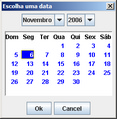
Permite o uso do teclado quando o foco está na grade de dias, Enter e Esc.