Tela
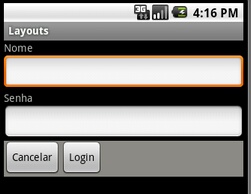
xml
<?xml version="1.0" encoding="utf-8"?>
<LinearLayout xmlns:android="http://schemas.android.com/apk/res/android"
android:layout_width="fill_parent"
android:layout_height="fill_parent"
android:orientation="vertical" >
<TextView
android:layout_width="wrap_content"
android:layout_height="wrap_content"
android:text="Nome" />
<EditText
android:layout_width="fill_parent"
android:layout_height="wrap_content"
android:textColor="#ff0000" />
<TextView
android:layout_width="wrap_content"
android:layout_height="wrap_content"
android:text="Senha" />
<EditText
android:layout_width="fill_parent"
android:layout_height="wrap_content"
android:password="true" />
<LinearLayout
android:layout_width="fill_parent"
android:layout_height="wrap_content"
android:background="#8B8B83"
android:orientation="horizontal" >
<Button
android:layout_width="wrap_content"
android:layout_height="wrap_content"
android:text="Cancelar" />
<Button
android:layout_width="wrap_content"
android:layout_height="wrap_content"
android:text="Login" />
</LinearLayout>
</LinearLayout>