Tela
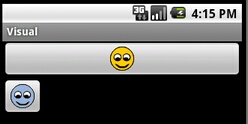
Java
package com.visual;
import android.app.Activity;
import android.os.Bundle;
import android.view.View;
import android.widget.ImageButton;
import android.widget.Toast;
public class ExemploImageButton extends Activity {
@Override
public void onCreate(Bundle icicle) {
super.onCreate(icicle);
setContentView(R.layout.exemplo_image_button);
ImageButton botaoImagem1 = (ImageButton) findViewById(R.id.img1);
botaoImagem1.setOnClickListener(new View.OnClickListener() {
public void onClick(View v) {
Toast.makeText(ExemploImageButton.this, "Imagem 1 OK",
Toast.LENGTH_SHORT).show();
}
});
ImageButton botaoImagem2 = (ImageButton) findViewById(R.id.img2);
botaoImagem2.setImageResource(R.drawable.smile2);
botaoImagem2.setOnClickListener(new View.OnClickListener() {
public void onClick(View v) {
Toast.makeText(ExemploImageButton.this, "Imagem 2 OK",
Toast.LENGTH_SHORT).show();
}
});
}
}
xml
<?xml version="1.0" encoding="utf-8"?>
<LinearLayout xmlns:android="http://schemas.android.com/apk/res/android"
android:layout_width="fill_parent"
android:layout_height="fill_parent"
android:orientation="vertical" >
<ImageButton
android:id="@+id/img1"
android:layout_width="fill_parent"
android:layout_height="wrap_content"
android:src="@drawable/smile1" />
<ImageButton
android:id="@+id/img2"
android:layout_width="wrap_content"
android:layout_height="wrap_content" />
</LinearLayout>